

 Trace. Question. Emerge.
Articles are general. Readers are specific. I built an AI chat to close that gap — it RAGs my entire blog about emergence theory and lets readers bring their own context to the frameworks I write about. A founder applies competition theory to SaaS pricing. A strategist rethinks geopolitics. Someone connects two posts I never expected to relate. Single Cloud Function, Gemini Flash, Firestore, no frameworks, $5–10/month.

Here’s the architecture.
Architecture
The frontend is vanilla JavaScript (2K lines, no dependencies) running on WordPress shared hosting (Hostinger, $4/month). It handles streaming SSE responses and session management. A PHP page template serves the chat interface, and a mu-plugin handles security monitoring.
The backend is a single GCP Cloud Function (Python 3.12) that does everything: reCAPTCHA Enterprise verification, IP-based rate limiting via Firestore, RAG retrieval (vector search + RSS feed), question classification, Gemini streaming, session management, and async Telegram alerts. A second Cloud Function handles security monitoring and budget backstops.
Firestore is the only database — it stores session state, vector embeddings for RAG, rate limiting counters, and security analytics.
RAG: Two Layers
Layer 1 — RSS feed (dynamic). Every hour, the function fetches the blog’s RSS feed, extracts up to 15 articles, and injects them as context. Zero indexing required. New posts are available within an hour of publishing.
Layer 2 — Firestore vector search (precise). Foundational articles are chunked (~1,500 chars each), embedded with gemini-embedding-001 (768 dimensions), and stored in Firestore. Each query gets embedded, and the top 4 chunks by cosine similarity are retrieved.
Vector search finds the most relevant chunks; RSS ensures fresh content is always available. If vector search fails (cold start, network timeout), the system falls back to full RSS context. For most blogs, the RSS layer alone gets you 80% of the way.
Smart Model Routing
Not every question needs an expensive thinking model. “What is emergence?” doesn’t require extended thinking. “If language shaped how humans abstract the world, and LLMs learn from that language, are they inheriting our abstraction blind spots?” does.
Prometheus uses a regex classifier that runs in <1ms (pure regex, no API call). Each query gets a complexity score based on keywords and query length, and the classifier routes it to the appropriate model. About 60% of questions are simple — greetings, “what is X?”, short queries — and go to Flash Lite. The rest go to Flash with extended thinking.
Context-Aware Starter Questions
Readers can invoke Prometheus from any page, and it arrives pre-loaded with starter questions based on the article they just read.
Coming from “The Sensing Surface” (about how understanding cycles through absorption, anomaly, and abstraction):
“What framework am I inside that feels permanent but might be mid-collapse?”
“Where is someone deliberately stalling understanding in my industry?”
Coming from “What Kind of Fight Is This?” (about six classes of competition):
“How do I identify which class a competitor is in?”
“What vulnerabilities does each class have?”
Guardrails and Budget Controls
Running an AI chat on a public site means you need abuse controls. IP-based rate limiting prevents individual users from running up API costs. Daily and monthly budget caps track actual Gemini spend in Firestore and shut off the chat automatically if thresholds are crossed, with Telegram alerts at every milestone. Security monitoring and automated blocking layers sit on top — shared hosting limits infrastructure-level controls, but WordPress hooks handle more than you’d expect.
Subscription as Earned Conversion
Users get 8 messages per session. That’s enough for a meaningful conversation. When they hit the limit, they see an option: enter your email for 5 more messages.
This is deliberately not a paywall. It’s “the chat was useful to you — want more?” The subscription is earned by the conversation, not demanded upfront. If the AI gave shallow answers for 8 messages, nobody would subscribe.
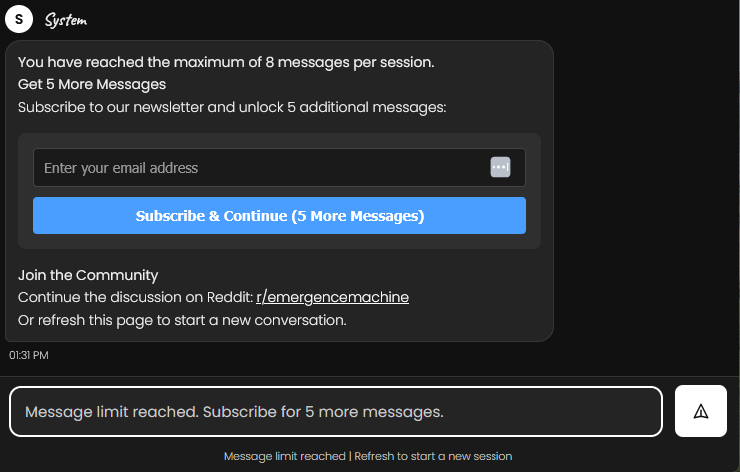
At the end of the extended session, users get a summary of their conversation and an invitation to continue the discussion in the project’s subreddit — a ready-made post they can copy over where they can talk with real humans if they are still curious or refresh page to start over. The email goes to WordPress’s Newsletter plugin via REST API, and the session limit extends immediately.
Cost Breakdown
This is a niche site — most days it gets bots and a handful of visitors, occasionally more. The entire infrastructure had to work at near-zero cost during quiet periods and scale without intervention during spikes.
At ~500 conversations/month (current traffic):
| Service | Cost/month | Notes |
| Website hosting (Hostinger) | $4 | Shared hosting |
| GCP Cloud Functions | ~$0 | Free tier covers it |
| Firestore | ~$0 | Free tier covers it |
| Gemini API (Flash + Flash Lite) | $1–10 | Varies with traffic and depth of questions |
| reCAPTCHA Enterprise | ~$0 | Free tier |
| Telegram Bot API | $0 | Free |
| Total | $5–15 |
At 10,000 conversations/month, Gemini API would be the dominant cost at ~$30–80/month. Everything else stays in free tier. Budget backstops are built in — if spend is exhausted due to a security incident or virality, the page displays a message that Prometheus is sleeping and to try again later.
The System Prompt Matters More Than the Stack
Prometheus’s personality is defined entirely in its system prompt. It doesn’t just answer questions — it probes assumptions, asks follow-up questions, and connects ideas across articles. The prompt defines what Prometheus is (an intellectual sparring partner, not a helpdesk bot), what it knows (the site’s original frameworks), and how it should think (challenge the reader’s framing, surface connections they haven’t made).
Getting this right mattered more than any architectural decision. The same RAG pipeline with a generic “you are a helpful assistant” prompt would produce forgettable output. The system prompt is what makes Prometheus more useful than asking the same question in ChatGPT or Claude — it has a point of view.
Why Own the Full Stack
Because I own the frontend, backend, and website layer, everything is customizable in ways no embedded chat widget or SaaS product can match: brand identity (custom fonts, colors, logo matching the site), response formatting (markdown tables, bold key terms, styled with my CSS), contextual behavior (different welcome messages and starter questions depending on which article the reader came from), and a subscription pipeline where the AI itself earns new subscribers.
The tradeoff is you build, secure and maintain it yourself. For a side project exploring AI, that’s the point.
Built with Claude Code
The entire implementation — frontend JS, Python backend, bash deployment scripts, Firestore schema, Cloudflare API integration — was built using Claude Code. I used defense-in-depth controls throughout: automated security monitoring, budget backstops, rate limiting, and Telegram alerting, so problems surface fast regardless of how the code was generated.
How to Build This for Your Blog
- Start with the system prompt. Define who your AI is and what content it knows. Why will it be more helpful for your readers than asking the same question in ChatGPT? This matters more than the tech stack.
- Do budget estimations. For my blog’s traffic, this made economic sense. For yours, it may not. Run the numbers before building.
- Threat model before you go live. You’re putting a public AI on the internet with your credit card attached. Map the risks then identify controls: rate limiting, budget caps with auto-shutoff, reCAPTCHA, input sanitization. Most are cheap. A surprise Gemini bill is not.
- Set up RAG with RSS. If your blog has an RSS feed, you get content ingestion for free. Fetch it hourly, strip HTML, inject as context. This alone gets you 80% of the way.
- Add vector search later. Firestore vector search is useful for precision, but RSS-based RAG works surprisingly well for most blogs. Don’t over-engineer early.
- Use Cloud Functions, not a server. You pay per invocation. At low traffic, it’s essentially free. At high traffic, it scales automatically. For a niche site, this is the difference between $1/month and $50/month to sit idle.
- Stream responses. SSE over Cloud Functions works. Users hate waiting 5 seconds for a wall of text. Streaming makes 5-second responses feel instant.
- Route by complexity. Even a simple regex classifier saves money. Most questions are simple — send them to the cheapest model.
- Monitor. It costs nothing and you’ll catch problems (and attackers) in real time. My first day live, I caught 3 vulnerability scanners probing for .env files.
- Build automated backstops. Active and passive controls. In-band and out-of-band security controls and budget limits. Detect, monitor and evaluate.
What’s Next
Prometheus currently runs on a single Cloud Function and a flat vector store. There’s room to grow.
The chat is live at emergencemachine.com/chat — try asking it something.
Related: how AI itself emerges, followed step by step on one ordinary street: How AI Emerges, Through the Lens of Emergence.